Best Employee Scheduling Apps in 2024
These are 6 of the best employee scheduling software solutions
What do a manufacturing plant, a retail store, and a logistics company have in common? They all rely on efficient employee scheduling, and it’s often harder than it should be. Manual planning, last-minute changes, and miscommunication can quickly lead to wasted time and unnecessary costs.
The right employee scheduling software simplifies the entire process. Managers can create and assign shifts faster, while employees can view schedules, request changes, and receive updates automatically. Many tools also include features like mobile access, shift swapping, and real-time notifications.
For this article, I tested a range of scheduling apps to find reliable, feature-rich options that balance flexibility with ease of use. Below are six standout tools worth considering for your business.
-
StreamTECH Our Top Choice!
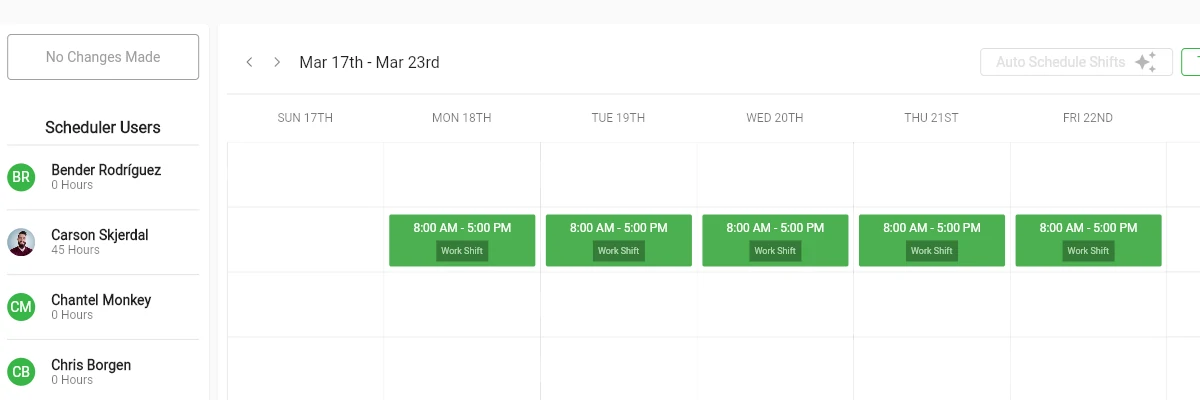
StreamTECH stands out with its integrated Timesheets & Scheduler system, built to handle everything from shift planning to real-time workforce tracking. Managers can create, adjust, and oversee schedules through a visual interface while ensuring full coverage and minimal conflicts.
Beyond basic scheduling, StreamTECH includes tools that significantly reduce manual work. The auto scheduler can generate shifts based on your re-occurring staffing needs, while features like “Who’s Working” provide instant visibility into your team at any given time. Time off requests are handled in one place, making approvals faster and more consistent.
For day-to-day operations, StreamTECH offers detailed timesheet controls, allowing shifts to be tracked down to the minute, including breaks, tags, and overtime. The Crew Manager feature also makes it easy to assign groups of employees to shared shifts, saving time on repetitive scheduling tasks.
Overall, StreamTECH is a strong choice for businesses that want more than just scheduling. Its combination of automation, real-time insights, and detailed time tracking makes it particularly effective for teams looking to improve efficiency and maintain full control over their workforce.
-
When I Work
When I Work is one of the most accessible scheduling tools on the market, especially for small to mid-sized teams. Its drag-and-drop scheduler makes it easy to build and adjust shifts, while employees can check schedules and communicate through a dedicated mobile app.
The platform combines scheduling, time tracking, and team messaging into a single system, reducing the need for multiple tools. Real-time notifications and shift swapping features help teams stay aligned without constant manager involvement.
It’s particularly well-suited for businesses with hourly workers, such as retail, hospitality, or service teams, where flexibility and quick communication are essential.
-
Deputy
When I Work is one of the most accessible scheduling tools on the market, especially for small to mid-sized teams. Its drag-and-drop scheduler makes it easy to build and adjust shifts, while employees can check schedules and communicate through a dedicated mobile app.
The platform combines scheduling, time tracking, and team messaging into a single system, reducing the need for multiple tools. Real-time notifications and shift swapping features help teams stay aligned without constant manager involvement.
It’s particularly well-suited for businesses with hourly workers, such as retail, hospitality, or service teams, where flexibility and quick communication are essential.
-
Homebase
Homebase is a popular choice for small businesses and teams with hourly employees. It combines employee scheduling with time tracking, hiring tools, and team messaging in a single platform.
One of its biggest advantages is automation. Managers can create schedules in minutes using templates and auto-scheduling, while employees receive instant notifications and reminders to reduce missed shifts.
The platform also includes labor cost tracking and integrates with POS systems, helping businesses align staffing with demand. For smaller teams looking for an affordable all-in-one solution, Homebase is a strong contender.
-
Sling
Sling is designed for teams that need flexibility and clear communication across multiple locations or time zones. It combines scheduling, time tracking, and messaging into a unified platform that keeps everyone aligned.
Managers can assign shifts, track availability, and manage time-off requests, while employees can swap shifts or pick up open ones directly through the app. This reduces administrative overhead and gives teams more control over their schedules.
Sling’s multi-language support and collaborative features make it especially useful for distributed or international teams that need consistent coordination.
-
Shiftboard
Shiftboard is built for organizations with complex scheduling requirements. It supports advanced shift patterns, workforce forecasting, and compliance tracking, making it well-suited for large teams or regulated industries.
The platform goes beyond basic scheduling by offering tools for attendance tracking, employee engagement, and labor planning. It also includes onboarding and workforce management features that help streamline operations at scale.
For companies managing large workforces, rotating shifts, or strict compliance rules, Shiftboard provides the depth and control that simpler tools often lack.